Archived Lightning
Archived Lightning data is available in the Energy, Wind
Energy and Utility editions of MxVision
WeatherSentry Online®.
This layer contains all of the cloud-to-ground strokes which occurred
within your selected time frame and purchased region.
|
|
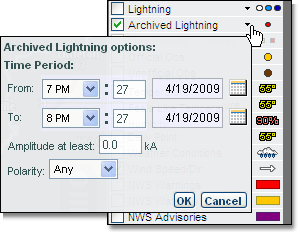
Click the small arrow next
to the archived lightning image. Here, you are able to set a time period
of up to 24 hours within the last 72 hours. If desired you may select
an amplitude threshold and polarity.
The Archived Lightning layer is available at all but
the two widest zoom levels. The data is represented as points contained
in grid boxes. The area of grid boxes is determined by the zoom level: |
|
State - 16 miles
Subregional - 10 miles
County - 6 miles |
Metro - 4 miles
City - 2 miles
Local - 1 miles
|
The Get Details tool can be used to determine
how many strokes occurred in a grid box or to get specific amplitude,
polarity, and location information for each stroke that occurred.
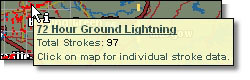 Select the Get Details icon. Hover your mouse over
one of the grid boxes to view a summary of the lightning data within that
grid box.
Select the Get Details icon. Hover your mouse over
one of the grid boxes to view a summary of the lightning data within that
grid box.
Click over the grid box to get details about all lightning strokes within
a grid box.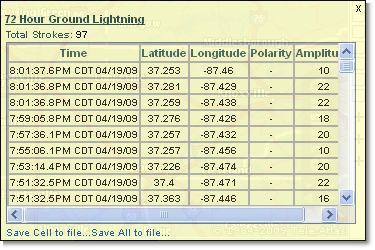
The lightning stroke details can be saved to a comma delimited format
(csv) file which can be opened in an application such as Microsoft® Excel.
Select the Save Cell link to save only the data within
one grid box. Use the Save All link to save all archived data within the
area currently viewed on your screen and your selected time frame.
In Microsoft® Excel you can analyze the data using any of the features
in the application, such as sorting by latitude and longitude.

 MxVision WeatherSentry Online