Current National Weather Service Tornado warnings will flash red in
counties and marine zones affected.
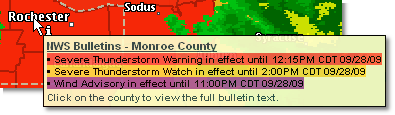
A summary of alerts in effect for a county can be viewed by clicking Get Details then hovering over the county of interest. The summary will include all alerts whether or not the layer is displayed. Each alert currently in effect is listed and color coded by type of alert (warning, watch, advisory).
|
Purple |
An NWS advisory has been issued for the county or marine zone in which your location is found. |
|
Gold |
The NWS has issued a watch for the county or marine zone in which your location is found. |
|
Red |
An NWS warning has been issued for the county or marine zone in which your location is found. When a tornado warning is in effect the county will flash red. |
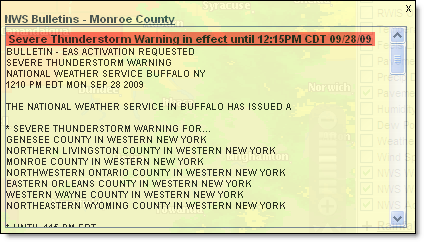 The full text of the alert in effect for a county
can be viewed by clicking Get Details then clicking the county of interest.
All alerts currently in effect will be listed with the full text from
the NWS. Here you can see the reasoning for the alert. The full text will
be listed in order of severity with the most severe alert at the top.
The full text of the alert in effect for a county
can be viewed by clicking Get Details then clicking the county of interest.
All alerts currently in effect will be listed with the full text from
the NWS. Here you can see the reasoning for the alert. The full text will
be listed in order of severity with the most severe alert at the top.
Note: Currently the full text can be printed from the layered map only by right clicking over the text and choosing Select All then Print. A more efficient method is to print the alerts by selecting NWS Weather Reports or National Graphics to access the text alerts from the NWS.
The Area of Maximum Impact is encoded in the warning issued by the NWS and Telvent decodes this outline and presents it on the NWS Warnings layer. You can then see what part of the county is most likely to be affected by the hazardous weather event. Use the Get Details option to view a summary of the warning that contains the area of maximum impact.

 MxVision WeatherSentry Online